FlexxSolve · Control and governance

Your call
By category and within your limits

Decide how autonomous support fits your operation. FlexxSolve applies your support policies, records the work and keeps Service Desk engineers involved when needed.

Overview

Set ticket policies, approvals, out-of-hours exceptions and consumption limits. Review and group results through the MCP server and API.

Set the route for ticketed work

Choose autonomous, AI-assisted or engineer-led handling by category. These routes can coexist. Assist Chatbot can independently help a connected employee without waiting for triage or a category decision, within its access and action limits.

Define the exceptions for out-of-hours support

Out-of-hours mode sets all categories to automatic autoremediation by default, except your explicit exclusions. Keep the categories that require a different route outside that default. Technical scope and action permissions still apply.

Keep approval and spending under control

Define when autonomous work needs approval. In Teammate Act, the engineer approves each action and can take control at any time. Set the model tier, allowance per ticket and monthly spending cap to control consumption.

Review the evidence in the tools you use

Retrieve and group diagnoses, actions, results and consumption through the MCP server and API. Explore them with compatible integrations for Claude, ChatGPT, Gemini or Microsoft Copilot, within the access you authorize.

Ask for interventions by category, support route or outcome, or find cases needing an engineer. Keep verified resolutions, diagnostics and Teammate assistance distinct when reviewing value.

Keep channels and knowledge connected

Use Chatbot, ITSM and MCP separately or together. ITSM can create, enrich and update tickets as well as receive them. Maintain the KB articles used in support, including the updates or removals needed to keep them useful.

Technical view

How each case is routed

Autonomous IT uses AI to diagnose issues and take action within policies you define, with Service Desk engineers involved when needed. FlexxSolve can start diagnosis as soon as a case arrives and brings reactive and proactive support together.

Autonomous IT guide

Resolution across the channels you already use

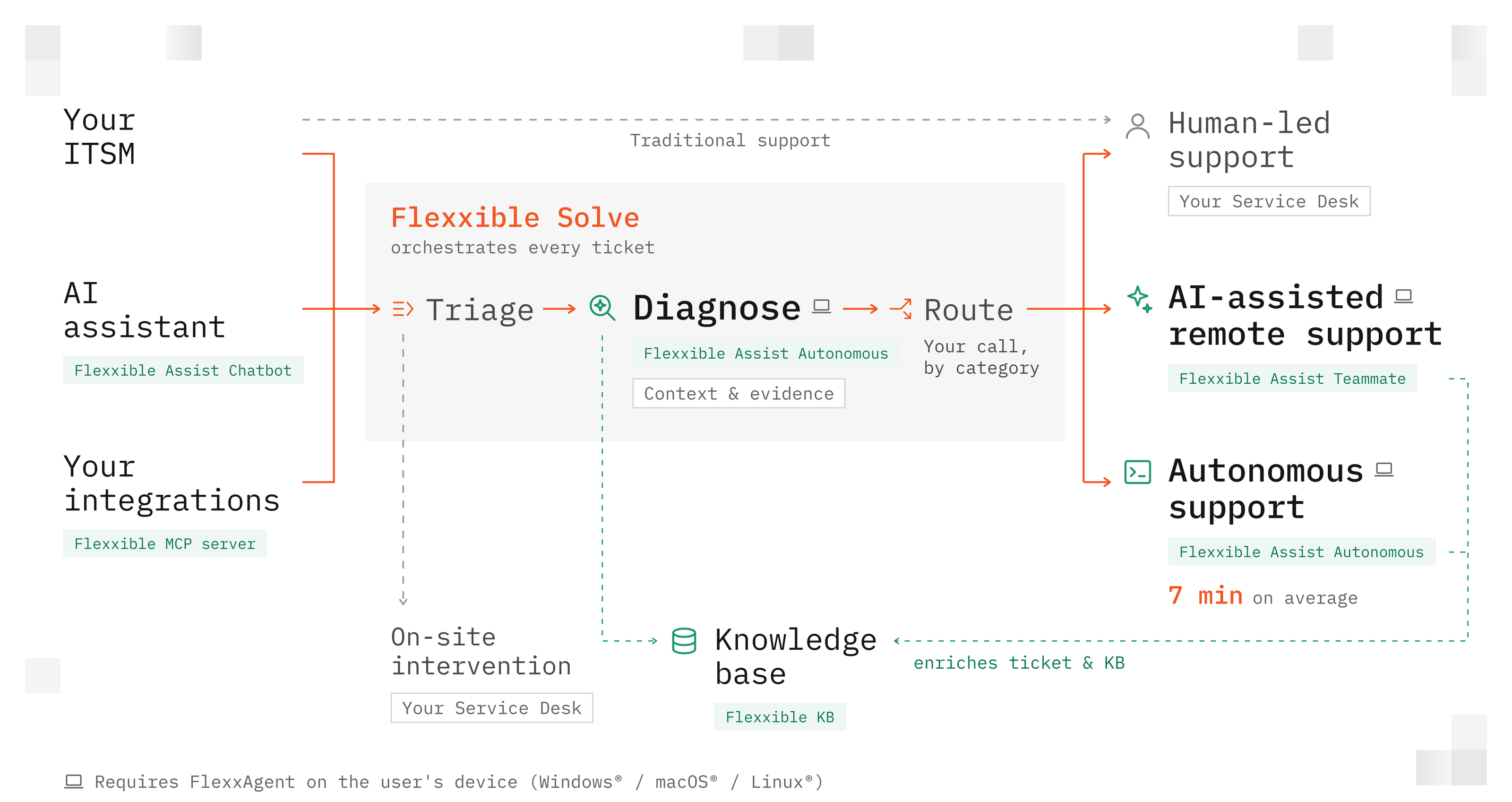
Assist Chatbot, your ITSM and the Flexxible MCP server are three ticket entry points. Use one, two or all three together; an ITSM connection is optional.

Reactive support

The diagram shows reactive support. FlexxSolve coordinates triage, diagnosis and routing for incoming tickets. Assist Chatbot can also help a connected employee directly, independently of triage and category.

Every case gets a clear next step

After diagnosis, each ticket follows the route you choose for its category: autonomous, AI-assisted or engineer-led. These routes can coexist.

Proactive support

Flows add proactive support. FlexxSolve executes Flows to address issues before employees ask for help. Flows currently require FlexxClient.

Frequently Asked Questions

Are Flows the same as agentic repairs?

Start with your own IT team

Choose 10 categories. Try 100 free interventions.