.avif)
The European digital workplace platform for better employee experiences, smarter IT operations, and work without friction.


Solutions
Flexxible Assist connects from the browser to any device already managed by FlexxClient. End-to-end encryption, personalization at the user and governance level, and an AI that guides the session while every action gets logged in near real time.
When someone needs support, the last thing that should matter is which tool the technician uses to connect. Yet in most organizations, that tool is a separate product: another agent to manage, another console to learn, another license to negotiate per technician. Remote assistance gets purchased and audited as if it had nothing to do with the rest of endpoint management.
If you already manage the full device lifecycle from your DEX platform, remote support belongs there too, under the same governance and the same level of auditing as everything else.
Flexxible Assist is the remote assistance solution built into FlexxClient. The technician opens the browser, clicks the device that needs attention, and, with the user's consent, views the screen, takes control, moves files, opens chat, or starts a video call. There is nothing to install on the technician's side, because the connection runs on modern web technologies to reach the remote machine quickly and securely, with no additional application required. It works for both attended and unattended sessions.
That shared foundation also makes the connection faster: Flexxible Assist cuts connection time by up to 95% compared to previous versions.
At the user level, the session adapts to whoever receives it: consent text and messages appear in the language set on their own machine, with the organization's logo and visual identity, so the person receiving support sees their own IT department, not a third-party tool.
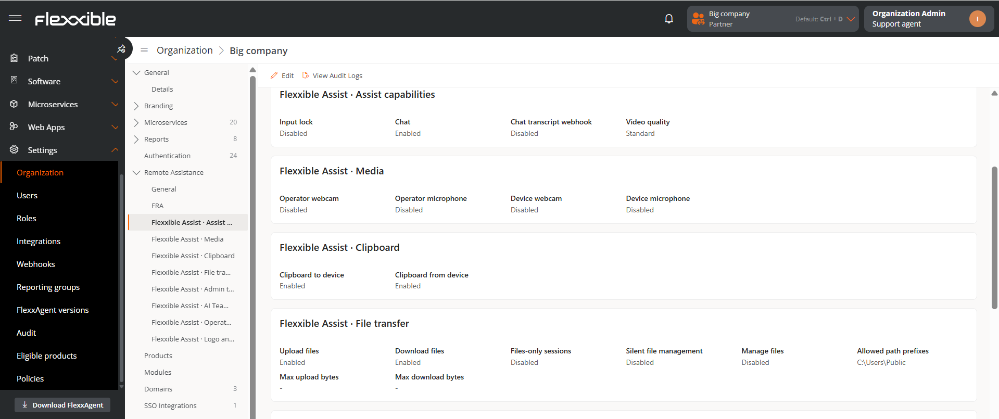
At the governance level, each capability gets enabled independently and under policy, at the organization or reporting group level: clipboard, file transfer, camera and microphone, admin tools, or the AI itself. File transfer can be restricted to specific paths and capped by size, and sessions on devices like kiosks or classroom PCs can run in silent mode.
In a category where almost everyone uses the same words to talk about security, what sets a product apart is what you can actually verify after the session ends.
Every session generates a signed record, delivered to the customer's own console in near real time: which files moved, which commands ran with elevated privileges, when the camera turned on, and which direction the clipboard was used, all without needing a database of its own for session content.
Each session also generates its own encryption keys and discards them once it ends, leaving no trace on any server. And every file transferred carries its own unique fingerprint, confirming it arrived exactly as it was sent, a guarantee rarely found in this category of tool. Nothing to manage in someone else's cloud, everything verifiable from the first second.
IT leaders leave behind the friction of asking a user for an admin password they don't have: admin tools open directly inside their session, with no UAC prompt, and every command gets logged.
Security and compliance leads get an answer to the first question any review raises: what happens to the data once the session ends. Nothing gets stored, and the evidence arrives signed in their own console.
Support teams get an instant connection inside the environment they already work in, with Teammate, the built-in AI, helping diagnose issues without ever leaving the console.
An employee needs something that requires admin rights, as simple as reinstalling a driver. With the traditional approach, the technician would have to ask for a password the user doesn't have, or escalate the ticket.
With Flexxible Assist, the technician opens the Admin Toolkit directly on the user's machine and runs the command with no UAC prompt. The ticket closes in the same session. The next day, the security lead reviews the week's activity and finds the exact record: command, timestamp, and authorization, signed and available without having to ask anyone for an explanation.
Teammate is the AI assistant built into Flexxible Assist, with two levels of autonomy. In Observe mode, it analyzes the session without intervening and generates a summary when it closes, covering the issue addressed and the outcome. In Guide mode, the technician describes the problem and Teammate reads the same screen the technician sees, pointing to where to act instead of taking the action itself. Control always stays with the technician.
Flexxible Assist reflects how we think remote support should work: one more capability inside FlexxClient, under the same governance and the same level of auditing you already apply to the rest of your fleet. Security shouldn't be a promise on a product sheet, it should be something every organization can verify for itself, session by session.
On September 30, Kilian Arjona, Flexxible's CTO, presents Flexxible Assist in a Live Launch, with a real-time connection and Teammate accompanying the session from start to finish. Register for the Live Launch.
For the full technical documentation, visit it here: technical documentation.
Ready to transform your DEX strategy? Discover how FlexxClient transforms digital employee experience management today.


Book a personalized demo or tell us what’s getting in the way.
We'll find the solution together.