
.avif)
The European digital workplace platform for better employee experiences, smarter IT operations, and work without friction.


Solutions
Most enterprises don’t engage in a UEM vs MDM debate. Instead, they discover that they’re paying for both during a renewal audit, with an EMM contract thrown in for good measure.
Yet for IT leaders responsible for growing the device fleet, all three can cause overlap issues, including:
One solution should be enough for your fleet, but the difficulty is knowing which one is the best fit.
This article will help you size that decision against your current setup by looking at which tier your fleet genuinely requires, what the overlap is costing you, and the one capability none of these tiers covers.
Contents list
FlexxClient measures what your device management stack can't: whether the technology your employees rely on is actually working. Book a demo to see the difference.
A unified endpoint management (UEM) platform manages every endpoint your organisation issues, including laptops, desktops, smartphones, tablets, wearables, rugged devices, printers and IoT devices, from a single console.
This range typically covers all types of operating systems, so Windows, macOS, Linux, iOS, Android, and ChromeOS users can make use of its capabilities.
UEM brings capabilities that enterprise fleets need, especially when scaling up. Beyond enrollment and policy enforcement features, it also includes:
IT admins gain one consistent set of security policies that work everywhere and avoid a mess of multiple tools with conflicting or duplicated rules.
Leadership, meanwhile, can combine three separate compliance views into a single, clear, unified picture.
Mobile device management (MDM) is a foundational tier of device management and deals with the device itself, including:
MDM is extremely valuable when well-implemented. It helps an IT team wipe a lost phone in minutes and pre-configure a newly issued tablet, all while covering compliance reporting.
Yet it has limitations. It governs hardware and its baseline configuration, but not the applications running on it. Corporate content on them might be left unmanaged, moving between apps, with no policy governing it, and it also misses the identity layer controlling access.
For a scattered fleet of company-owned and personal devices, this can mean you are enforcing rules on the hardware but have no control over data.
Enterprise mobility management (EMM) was designed to be the bridge tier between the two above solutions. It’s much less common these days after many of its capabilities were folded into the broader UEM suite of tools.
EMM offered MDM plus the following components:
Yet, its most memorable contribution is Bring Your Own Device (BYOD), which helped IT admins separate corporate apps and data from employees’ personal devices via secure containers and containerization.
Tip: If you hold a standalone EMM contract, it's worth checking what your UEM licence already duplicates.
Looking at the three solutions above quickly shows us that a direct comparison isn’t the best way of analyzing them.
Instead, it’s best to picture them as tiers, with both UEM and EMM absorbing features of the one below it.
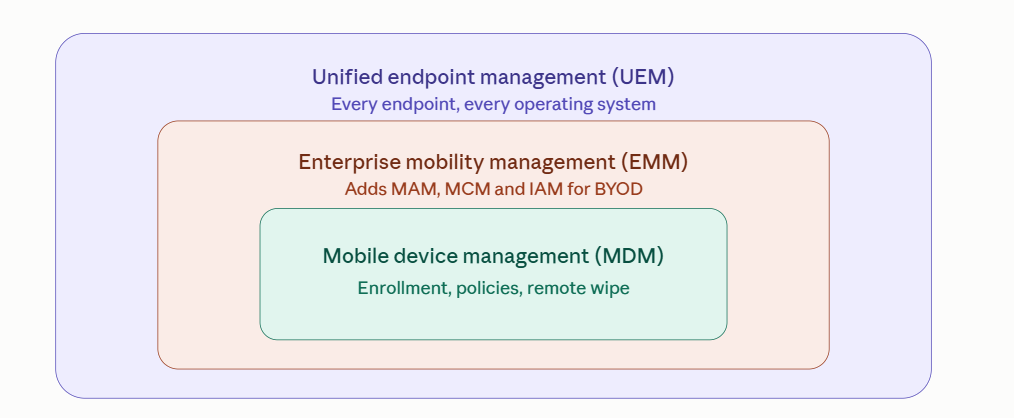
Only by understanding this can enterprise leaders match the right tier to their fleet.
First, let’s pull away from the common mistake that IT leaders make: MDM, EMM and UEM shouldn’t be seen as a “Vs.” debate. Instead, the three solutions form a maturity sequence, each acting as a broader tier that absorbs the one below it and matches a different type of organization.
To this end, here’s a rundown of the three solutions and the enterprises they best fit.
Agile frontline and field teams with a minimal desktop estate often find that MDM suits what they need. They run smartphones, tablets, and rugged devices, which MDM’s security policies and remote wipe cover. Adding tiers here is pointless as you buy capability that you won’t configure.
Estates with a mix of laptops, macOS machines, and personal phones will see EMM as the most suitable. Corporate data now sits on hardware your enterprise doesn’t own, so you need mobile application management and secure containers that EMM provides.
UEM is the only tier that reports across an entire virtual fleet, including IoT devices, printers, virtual desktops, and Linux machines that nobody documented. It’s a must-have when every endpoint must meet security and compliance obligations.
All three of the above tiers report device state, including enrollment, patches, and compliance, which will help you meet audits, but they all miss out on a crucial element: what the device feels like for the employee.
A slow or unstable laptop can still tick every check on that list but be a major frustration for the person using it, and nothing in a device management stack will tell you this.
IT leaders face a blind spot with device management tools. They can tell you when an update completes successfully on a laptop, but it won’t tell you that the very same update is causing login times to triple across the finance team.
In short, IT admins can prove the fleet is configured right, but they can’t prove it’s working. This might show up in three places that leadership tends to pick up on:
Compliance reporting is the usual answer to that last point, but it's a weaker proof than it looks.
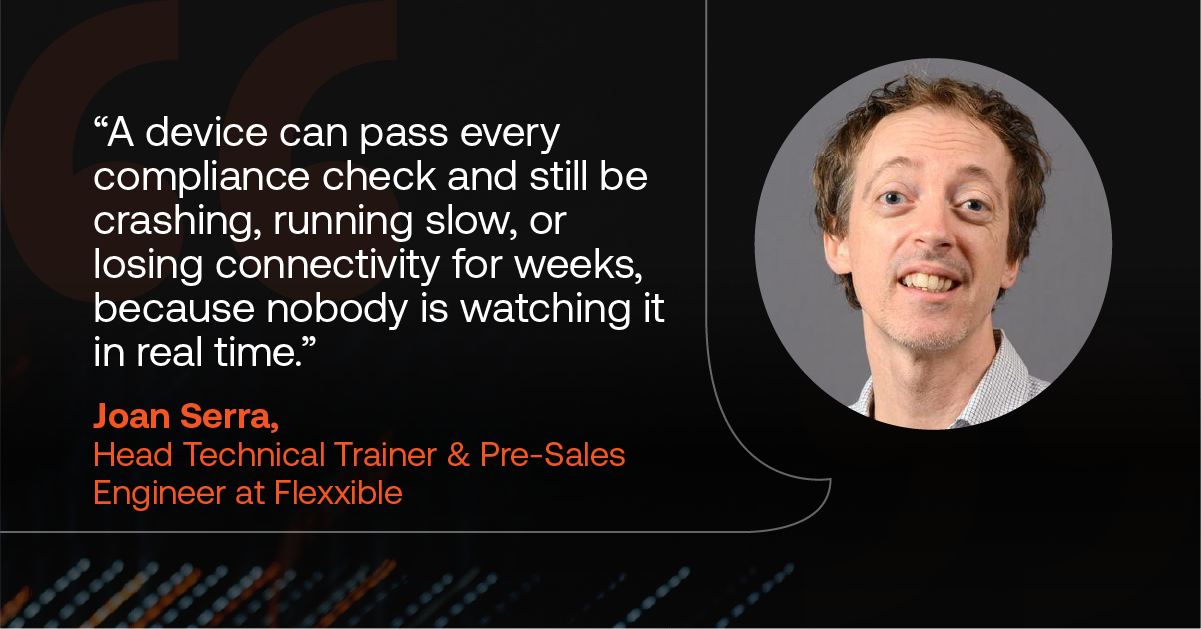
"Compliance on paper is a snapshot. It tells you a policy was applied at some point," says Joan Serra, Head Technical Trainer & Pre-Sales Engineer at Flexxible. "Without that ongoing layer, a device can pass every compliance check and still be crashing, running slowly, or losing connectivity for weeks, because nobody is watching it in real time."
Digital employee experience (DEX) tooling provides this missing layer. It measures how your employees feel about an endpoint’s performance (DEX score) and then pairs it with direct feedback so that you get a head start on digital friction before it turns into a support ticket.
According to Gartner, organisations with DEX tools cut endpoint TCO by 10-15% and endpoint-related incidents by 40-60%, but only where the organisational maturity exists to act on what the tooling surfaces.
As an IT leader, you may already have one or more of the above solutions within your estate, but none of them can help you answer an important question your board is asking: Is any of this actually working for the people using it?
FlexxClient is a digital employee experience platform that’s designed to measure and improve what device management feels like in practice. Sitting alongside your UEM platform rather than replacing it, it provides continuous DEX scoring across a remote network of physical and virtual endpoints and combines it with direct employee feedback.
This means you get experience data, patch management, and remote remediation from a single console, which comes with CrowdStrike integration to keep endpoint security in the same place as the fixes, rather than in a separate platform.
Yet there are certain limits. FlexxClient is not a UEM replacement because it has no iOS, no zero-touch enrollment, and no mobile application management. If those are your gaps, UEM is still the best purchase.
FlexxClient does, however, help enterprises recover up to 78% of downtime because it detects the issues that employees struggle with before they even notice them and fixes almost a fifth of them without a ticket ever reaching your team.
That's the part no device management tier is built to deliver. An UEM platform proves the estate is configured. FlexxClient proves it's working and does something about it when it isn't.
Your UEM platform tells you the fleet is compliant. It won't tell you whether anyone can work. Book a demo and find out what your estate looks like from the employee's side.
MDM manages mobile devices: enrollment, configuration profiles, security policies, and remote wipe.
UEM covers every endpoint your organisation issues, including laptops, desktops, printers, and IoT devices, across all operating systems. It also adds patch management, vulnerability management, and endpoint security integration from one console.
No, though the line has blurred. EMM was MDM plus mobile application management, mobile content management, and identity and access management, and was built largely for BYOD.
UEM absorbed those capabilities and extended them across desktops and non-mobile endpoints, which is why standalone EMM contracts are increasingly rare.
It depends on fleet shape rather than headcount. Mobile-first, company-owned estates are covered by MDM. Mixed fleets with BYOD need EMM capabilities, now usually delivered inside UEM. Regulated, multi-OS estates need UEM, since it's the only tier reporting across every endpoint type.
UEM manages desktops, laptops, printers and IoT devices alongside mobile, applies one consistent set of security policies across every operating system, and handles patch and vulnerability management at estate scale. MDM stops at the device boundary, governing hardware configuration but not the applications or data on it.


Book a personalized demo or tell us what’s getting in the way.
We'll find the solution together.