

The European digital workplace platform for better employee experiences, smarter IT operations, and work without friction.


Solutions
Ask your service desk team how much time they spend fixing the same problem, and you’ll probably get one answer over and over again: “a lot”.
An autonomous service desk is designed to take that repetitive work off their hands by solving three of the biggest headaches for IT leaders, including:
Repeat incidents like this are the hidden cost of running a service desk at scale, yet these expenses often fly under the radar.
This guide shows how an autonomous service desk can diagnose and fix those incidents on the device, then check that the fix held.
We’ll cover how to build one in four phases, and how you can decide which incidents to solve first, and which to pass onto your team.
Contents
FlexxSolve and FlexxClient give your employees technology experiences that safely enable business continuity and deliver measurable results to your business. Book a demo to see them in action.
An autonomous service desk diagnoses and resolves support tickets on the employee’s device without human intervention.
This is a big step up from the AI that most service desks currently use. Typically, this involves a chatbot or conversational AI using natural language processing (NLP) or generative AI to understand a request, search the knowledge base, or send the ticket to the right assignment group. Resolution is generally faster, but a technician still must fix the problem.
Service desk automation takes out this last step by using AI agents to read the request, then cross-checking the ticket data with live device data to diagnose the problem.
It then does one of two things depending on the limits the IT team has set:
The goal is simple: Fix as many routine incidents as possible and free skilled engineers up for work that genuinely needs them.
However, autonomous service desks differ in how they do this, in terms of how far their automation goes and how much control they give the IT team. The next section gives a general overview of what you should expect.
An autonomous service desk operates depending on the vendor supplying it.
Atera has built Robin, an AI agent it says fixes device and cloud issues autonomously, into its IT management platform. Nexthink has added Spark, a personal IT agent that uses endpoint telemetry to resolve issues at first contact. Nanoheal, meanwhile, focuses on finding and fixing problems on the device itself.
FlexxSolve, Flexxible’s new AI service desk agent, gives you all the benefits of autonomous IT support but on your terms. When your employee asks for help, either through a chat or ticket, FlexxSolve examines the device and then follows your own IT guides, just like an experienced engineer would.
It then takes one of three courses of action:
Control is embedded in the process from the start. Your IT team decides which route you take, sets approvals and spending limits, and reviews every step. FlexxSolve is a strong fit for large hybrid estates, especially in regulated industries and the public sector where control is just as important as speed.
When building an autonomous service desk, it’s tempting to make wholesale changes, but it works better as a gradual process.
Below is a four-phase plan, using FlexxSolve, that helps your team collect the data and build the trust you need to progress to the next level.
Every IT team has support tickets that they solve repeatedly, in the same way every time. These are the easiest to automate and the quickest to show results.
Flexxible’s customers typically start with these categories:
These are simple tasks, but together they can snowball into a large share of analysis time that you could better use elsewhere.
Autonomous service desks like FlexxSolve can fix these in the background without opening a remote session or interrupting the employee. Automated scripts like these are often the first building blocks of IT service desk automation as they turn a fix your team already knows into one that runs on its own.
You don’t need a full rollout or an ITSM connection to begin, either. “You can install the FlexxSolve agent on all the devices you want,” says David Planelles, Business Development Manager at Flexxible. “If you don’t wish to connect your ITSM, then you can also access the chatbot via a web link.”

If you’re not ready to commit yet, then you can sign up for a FlexxSolve trial that includes 100 free interventions across 10 categories of your choosing.
Setting boundaries is an important step because it helps keep human control written into auto-remediation.
First, your IT team should decide how the agent handles each incident category. We can define these in three broad categories: full autonomy, autonomy after approval, or sent to an engineer.
Then, you can set spending limits and decide who reviews the audit trail. FlexxSolve makes this task clearer with a simple split of responsibility: Flexxible’s engineers certify how each fix in the catalog works, and your team decides where and when each certified fix can come into play.
FlexxSolve helps you include automated fixes within your change management process, so every action on an endpoint is recorded and traceable. This avoids costly errors that can happen when changes reach devices without review. “Proactivity without governance is just a faster way to make mistakes,” says David Planelles.
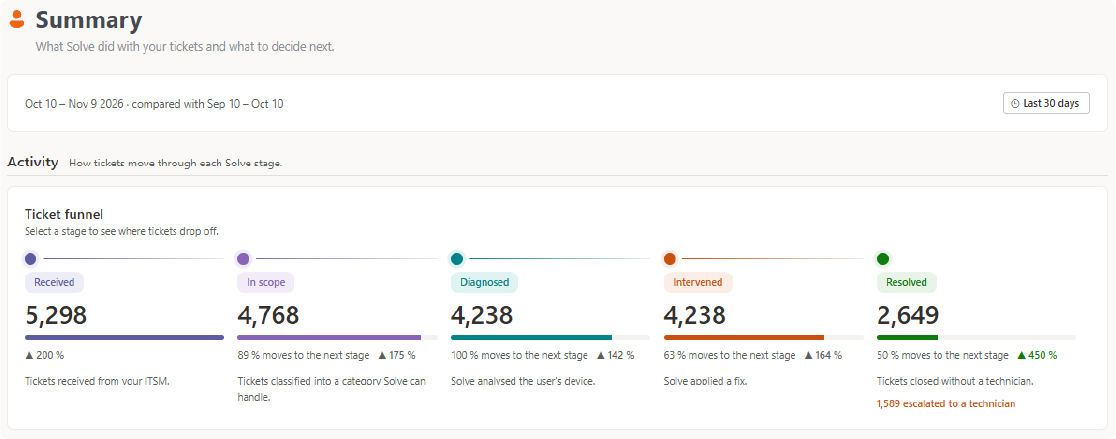
Many IT leaders get caught up in the number of support tickets autonomous IT gets to, but the acid test is how many it actually resolves.
Once FlexxSolve is live, record the following outcomes:
Only a fix that has been checked counts as a resolved problem. Keeping these numbers apart gives you an honest view of mean time to resolution (MTTR) and shows which categories are ready for more autonomy.
This gives you a different insight into performance.“Shifting from measuring ticket volume to measuring user experience and business impact. Until the KPIs change, behavior won’t,” says David Planelles.
Knowing how to measure digital employee performance like this will help you prove the value of automation in terms business leaders care about, including faster recovery and less downtime, which frees up labor hours for more complex tasks.
At this point, you’ll see which incidents keep returning and which fixes work best: this is when you can stop waiting for tickets and start automating fixes.
FlexxSolve calls these fixes Flows. You can program these to run when a known problem appears, triggered by events you choose. This works differently from traditional robotic process automation, which follows a fixed script: instead, a Flow is built on an incident pattern you’ve already seen resolved and verified. The more often a problem happens, the less often anyone has to touch it. This is where incident automation becomes truly self-healing IT.
Flows currently require FlexxClient, Flexxible’s DEX platform, because it monitors the fleet, which lets it trigger the fix and then measure the impact.
Once your autonomous service desk is up and running, you’ll start to collect data, which will tell you where to expand to. You’ll need to decide what to automate next.
One part of the story is ticket data because it shows the problems employees report, but you’ll also need to watch the endpoints themselves for information such as:
This makes up the digital experience monitoring that will give you deep insights to start a continuous improvement loop: once you know the key DEX signals to watch, you’ll be able to grow your service desk one verified fix at a time.
You may need to train your staff to help them adapt to this data-led approach. “Getting your team to trust the data over their instincts, and to stop seeing automation as a threat to their jobs may be a real challenge”, says David Planelles.
Once engineers can see what was fixed, and how it was checked and recorded, however, then you can quickly start to build trust.
FlexxSolve gives you an autonomous service desk you can start using this week, on your own terms. Begin with the incidents your team repeats every day, set the limits yourself, and let every verified fix prove the case for the next one.
Add FlexxClient when you’re ready to go proactive, and the same platform will spot, fix, and measure problems before anyone raises a ticket.
Start with 100 free interventions and see what FlexxSolve can resolve in your environment. Try FlexxSolve today, or book a demo with our team.
An autonomous service desk works to diagnose issues and resolve them on an employee’s device using agentic AI. This takes out the need for a technician on these tasks yet still lets the IT team set limits within which it can operate. The tool also hands any problems outside of these limits to an engineer, with a diagnosis.
High-volume, low-risk incidents are the best way to test out a service desk. These might include stuck print queues, VPN and Wi-Fi drops, or stalled updates. Common yet uncomplicated, these take up valuable helpdesk time but very rarely need human judgement.
Yes. With FlexxSolve, you can send requests through your own corporate chatbot, or a chatbot via a web link so you don’t need to connect your IT service management tool.
Automate the incidents you already fix by hand, then measure which of these hold. Once you trust a fix, you can turn it into a Flow that happens automatically once a problem appears.
Endpoint management data shows you which incidents to tackle next, so you can start to improve service delivery over time.


Book a personalized demo or tell us what’s getting in the way.
We'll find the solution together.