Flexxible Solve · Autonomous IT

An autonomous Service Desk that never sleeps

FlexxSolve gets people back to work and reduces repetitive work for Service Desk engineers, while you stay in control.

How autonomous IT works

Resolution starts the moment the case arrives

Autonomous IT uses AI to diagnose issues and take action within policies you define, with Service Desk engineers involved when needed. FlexxSolve can start diagnosis as soon as a case arrives and brings reactive and proactive support together.
Autonomous IT guide

Resolution across the channels you already use

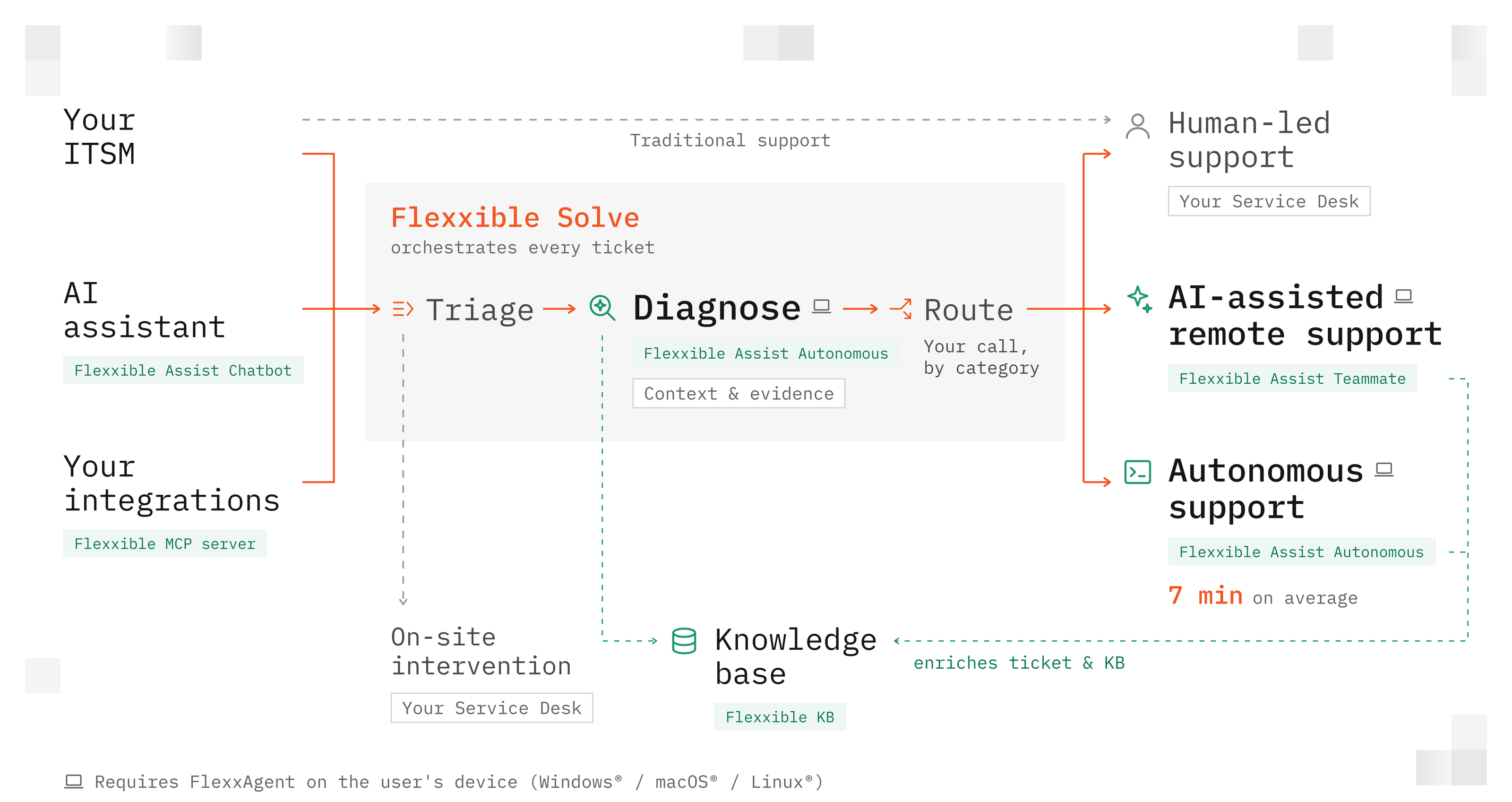
Assist Chatbot, your ITSM and the Flexxible MCP server are three ticket entry points. Use one, two or all three together; an ITSM connection is optional.

Reactive support

The diagram shows reactive support. FlexxSolve coordinates triage, diagnosis and routing for incoming tickets. Assist Chatbot can also help a connected employee directly, independently of triage and category.

Every case gets a clear next step

After diagnosis, each ticket follows the route you choose for its category: autonomous, AI-assisted or engineer-led. These routes can coexist.

Proactive support

Flows add proactive support. FlexxSolve executes Flows to address issues before employees ask for help. Flows currently require FlexxClient.

Work keeps moving

Resolution starts the moment the case arrives

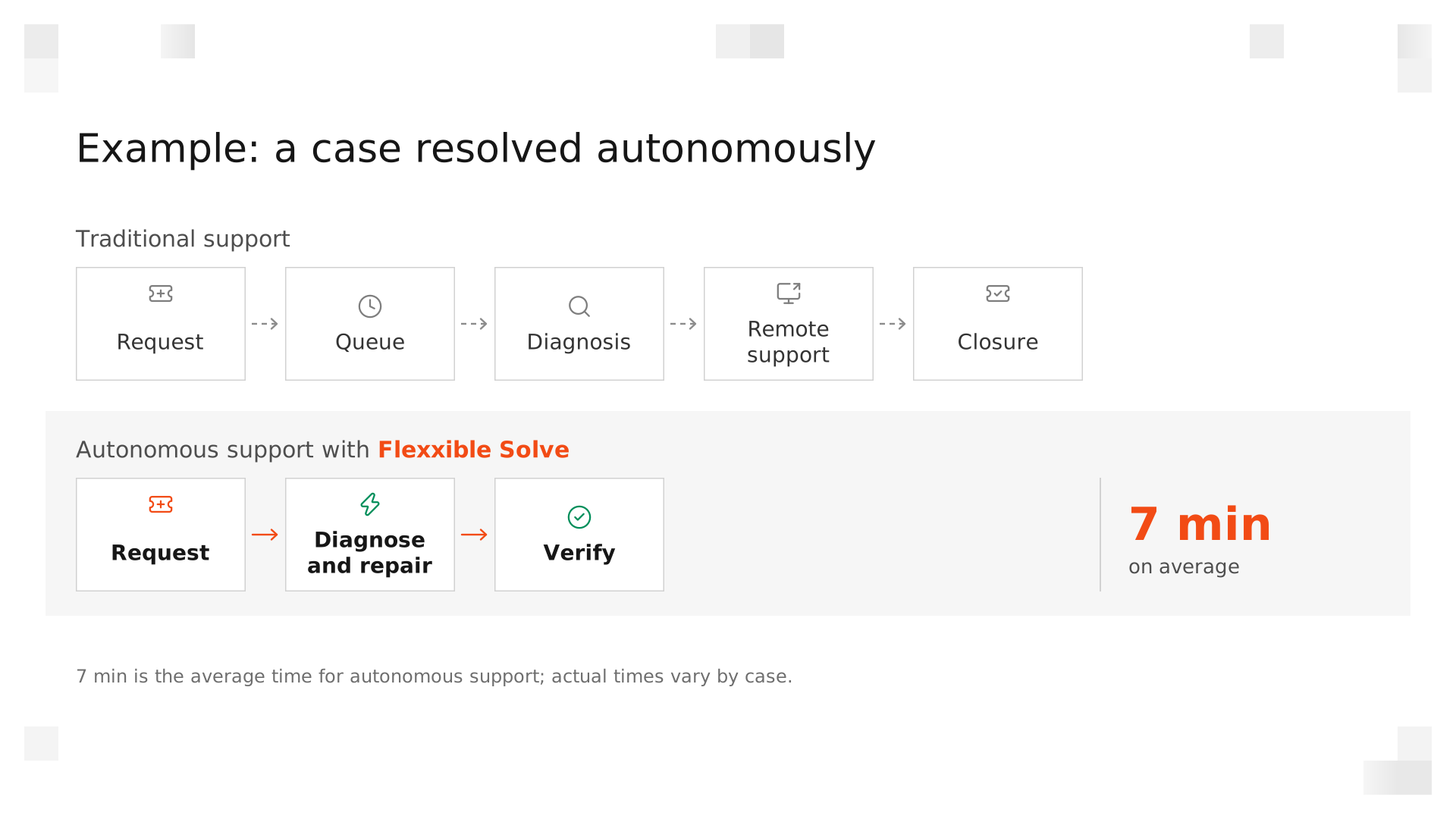
FlexxSolve understands the issue, acts within your rules, and verifies the result so people get back to work sooner.

When an issue can be resolved safely, Solve acts and verifies the result. When a person is needed, the case arrives with the diagnosis, context, evidence, and actions already prepared.

More time for work that needs judgment

Recurring issues and their documentation take less manual work, so Service Desk engineers have more time for exceptions, complex problems and service improvements.

More capacity, still under control

Many employees have no IT support at night or on weekends, and after-hours cover may exist only for VIPs. FlexxSolve extends support into those hours, within the categories, exclusions and limits you set.

125

Resolvable ticket categories in the observed dataset

Each category describes an issue area; the diagnosis establishes which action is appropriate and whether a remote repair is possible.

  • Email & collaboration — Outlook (connectivity + profile)
  • Storage — Critical disk space
  • Printing — Spooler / driver / printer mapping
Explore supported categories
Your call

Autonomy on your terms

Choose how ticket categories are supported. Set approvals, spending limits and out-of-hours exceptions, and review the actions taken. Your team stays in control as you expand autonomy. Too early for autonomous IT? Give it the night shift.

Explore control and governance
Colleagues working on laptops in a glass meeting room in the evening

Frequently Asked Questions

Do we need to connect our ITSM?

What counts as an intervention?

Does triage use the 100 interventions?

Are the 10 categories chosen for us?

Proof, not promises

Start with your own IT team

Choose 10 categories. Try 100 free interventions. Install FlexxAgent on a small group of IT devices and try Assist Chatbot or create test tickets. You can start without connecting your ITSM.

Try FlexxSolve
Choose 10 categories
Try 100 free interventions
No ITSM connection required
Start your trial
No items found.
RESOURCES

Featured Resources

No items found.

FlexxSecurity Features

Support

Diagnostics

Automation

Software Asset Management

Digital Experience Managment

Management

Monitoring

Security

DaaS Compute

DaaS Cloud

Explore FlexxDesktop Plans

FlexxDesktop Standard

Our flagship DaaS offering for managing digital workspaces with custom automation and advanced infrastructure monitoring

Base features:

check icon

Support

check icon

Diagnostics

check icon

Automation

check icon

Software Asset Management

check icon

Digital Experience Management

check icon

Security

check icon

Monitoring

Request More Details

FlexxDesktop Advanced

Adds 24/7 support, monitoring and management from our global service centre.
‍

Base features:

check icon

Support

check icon

Diagnostics

check icon

Automation

check icon

Software Asset Management

check icon

Digital Experience Management

check icon

Security

check icon

Monitoring

Extras:

check icon

Management

Request More Details

FlexxDesktop Enterprise

Adds our validated hardware stack for VDI and DaaS in your datacentre
‍
‍

Base features:

check icon

Support

check icon

Diagnostics

check icon

Automation

check icon

Software Asset Management

check icon

Digital Experience Management

check icon

Security

check icon

Monitoring

Extras:

check icon

Management

check icon

DaaS Compute

Request More Details

FlexxDesktop
Edge

Fully hosted DaaS platform for the most demanding enterprises

‍

Base features:

check icon

Support

check icon

Diagnostics

check icon

Automation

check icon

Software Asset Management

check icon

Digital Experience Management

check icon

Security

check icon

Monitoring

Extras:

check icon

Management

check icon

DaaS Compute

check icon

DaaS Cloud

Request More Details