
Most desktop-as-a-service (DaaS) guides are great at explaining how to architect a virtual desktop environment, yet they tend to go quiet when you go live.
If you’ve ever supervised a DaaS deployment, you’ll know that this is when the problems tend to start, including:
- Employees complaining about sluggish sessions and degraded audio on calls
- A loss of visibility (and control) that you used to have on-site, which makes troubleshooting slower and compliance reporting harder.
- Costs drifting out of budget thanks to hidden management and storage overage fees
None of these issues shows up in the standard DaaS buyer's guide, but they're exactly what determines whether your deployment succeeds or quietly becomes another IT liability.
This article covers what those guides tend to leave out: namely, why deployments steadily degrade after go-live, not just how to ensure a successful DaaS implementation.
We’ll look at what a well-run DaaS environment should look like, and what to look for in a provider before you're locked into the wrong one.
Contents:
- What are the benefits of desktop-as-a-service?
- What are the disadvantages of DaaS – and why do DaaS deployments fail after going live?
- What does a well-managed DaaS environment look like?
- Control costs, monitor experience, and own your data with FlexxDesktop.
Most DaaS deployments struggle with the same three problems. FlexxDesktop solves all of them. Book a demo to see how.
What are the benefits of desktop-as-a-service?
Desktop-as-a-service is an operational advantage for organisations with distributed workforces because it helps them solve problems that traditional on-premises workstations weren’t built for.
Before getting to what goes wrong, it's worth being clear on what a well-implemented DaaS environment should deliver:
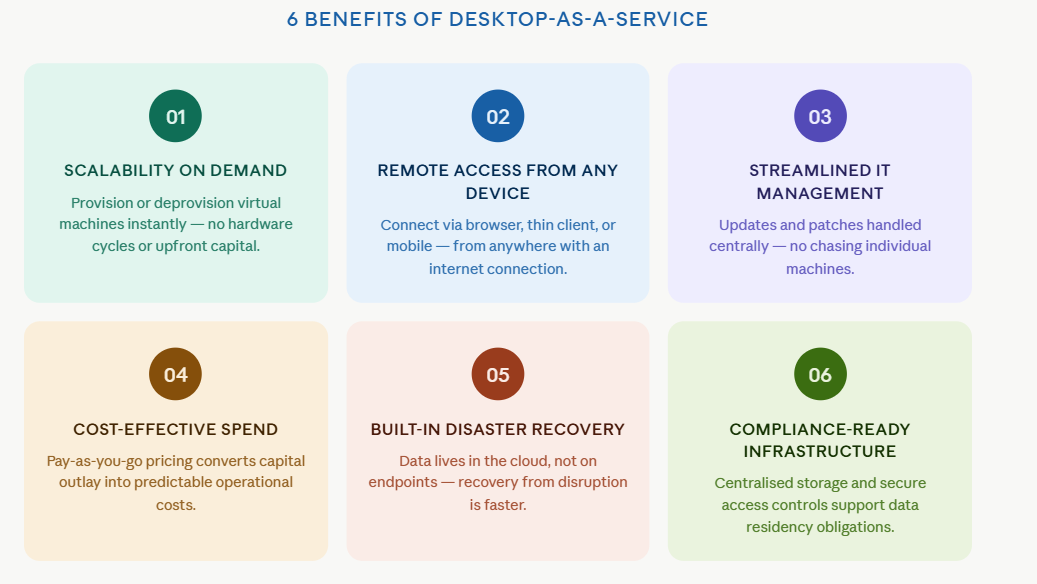
- Scalability on demand. You can provision (or deprovision) virtual machines instantly, without hardware procurement cycles or significant upfront capital investment.
- Remote access from any device. Employees can connect via their mobile device, a desktop web browser, or even a thin client, from anywhere with an internet connection.
- Streamlined IT management. Your IT team handle software updates and security patches from one place instead of chasing updates across individual machines.
- Cost-effective spend. Most DaaS services operate on a pay-as-you-go pricing model, converting capital outlay into predictable operational costs.
- Built-in disaster recovery. Data lives in DaaS cloud environments rather than on endpoints, so your team recovers from disruption faster.
- Compliance-ready infrastructure. You get to store data centrally with secure access controls, which fall in line with data residency and regulatory obligations.
Virtual desktop infrastructure (VDI) requires you to manage on-premises servers and backend hardware yourself, but cloud-based DaaS removes this. Instead, your cloud provider (such as Microsoft Azure or AWS) handles the underlying infrastructure. This leaves your IT team to focus on the user experience.
With less capital tied up in hardware and less time spent on maintenance, DaaS becomes a scalable solution for distributed workforces. It helps divert IT management resources toward optimising the desktop experience for end-users, instead of using up time maintaining physical workstations.
The 6 Top Desktop-as-a-Service Benefits
What are the disadvantages of DaaS, and why do deployments fail after go-live?
Most DaaS sales pitches are compelling – as a CIO or IT director managing a distributed workforce, you may think you have the overhead problem solved.
A fully managed cloud workspace, accessible from any device, with your service provider managing the infrastructure. What could go wrong?
Then, go-live happens, and you find yourself confronted with the following issues.
1. Latency and session performance
The first sign of trouble is usually latency. Many DaaS providers promise a high-performance desktop experience, but this depends heavily on the quality of your internet connection.
“With many DaaS solutions, you can have 100% infrastructure uptime and still have employees suffering through laggy sessions, degraded audio on Teams calls, or slow profile loads,” says Jenn Keane, Marketing & PR Director at Flexxible.
The accumulated drag of this is obvious. It may only be a few lost minutes for each employee, but combined over a large remote workforce, it becomes a serious time and productivity leak.
2. Visibility loss
IT teams need to see exactly where performance is degrading, but most cloud-based DaaS solutions don’t have that transparency.
“Without integrated Digital Employee Experience (DEX) monitoring built into the same platform managing the desktops, IT is essentially flying blind between helpdesk tickets,” says Jenn.
Your IT staff start getting end-user complaints but don’t have the observability tools to identify root causes. They also can’t get access to the backend infrastructure producing them.
Proactive support quickly goes out the window.
3. Compatibility and authentication failures
Installing a new DaaS comes with compatibility issues. Many applications that ran reliably on Windows 10 workstations don’t always work in a new environment.
The problem is, you often don’t find these out until critical windows. These are the times when authentication failures that lock employees out of sensitive data and integrations that need reconfiguring in the cloud really impact the organisation in terms of downtime.
4. Cost drift
Subscription models appear predictable, but what happens when you want to scale?
Cost drift can accumulate in the form of surprise costs, including:
- Hidden fees for storage overage
- Extra management layers
- Additional integrations that aren’t in your original contract
A better SLA rarely fixes this. A unified service, where pricing, monitoring, and desktop management sit in one platform, is much more likely to keep costs down.
What does a well-managed DaaS environment look like?
It’s tempting to think that the above issues are inevitable DaaS features, but this isn’t the case. They often occur as a result of choosing a platform that was built to deploy desktops, but not keep them running at the standard employees expect.
The right provider is more likely to provide a well-run DaaS environment because it boasts features that separate a managed service from a managed problem.
1. A transparent, stable pricing model
With DaaS spending set to grow by 7.9% (CAGR) by 2029, cost optimisation is emerging as the core driver for increased adoption, according to Gartner.
This heightened competition between DaaS providers will likely mean that the right one will need to offer a pricing model that doesn’t erode with storage overages, add-on management layers, or annual reconciliations. Instead, a flat per-user monthly fee with no adjustment clauses should be a baseline expectation.
Organisations will thus be able to keep cost drift at bay and give finance teams a number they can actually forecast.
2. Integrated experience monitoring
Gartner includes DEX and digital experience monitoring as a standard feature expectation in the DaaS market.
“DEX is a concentrated effort to remove digital friction and improve workforce digital dexterity,” says Matt Cain, former VP Analyst at Gartner. “ It’s one of the key factors that will drive organisational prosperity through 2030."

It's easy to see why. Most of the performance issues that surface after go-live, including latency and compatibility failures, are symptoms of the same underlying problem: no one can see what's happening at the endpoint level until an employee raises a ticket.
Despite Gartner flagging this as a standard feature expectation, most deployments still rely on a separate tool running alongside the desktop platform.
Correlation thus becomes a problem: it means your team is cross-referencing data across systems to diagnose something that should be visible in one place.
3. Sovereign data residency by design
Knowing where your data lives has become a serious procurement consideration, especially if you’re a European organisation operating under GDPR or the NIS2 directive.
A platform that can demonstrate by design, not by configuration, exactly where it stores and processes data is much easier to evidence under audit than one relying on contractual assurances added after the fact.
This is important when it comes to renewal, too. Residency bolted on as an aftermarket option can shift, but it can’t when it’s built into the platform's architecture.
Few DaaS providers address all three of the above criteria consistently, yet FlexxDesktop, Flexxible’s fully managed DaaS platform, is one of them.
It’s built around exactly this combination: fixed per-user pricing, DEX monitoring integrated into the core service, and sovereign data residency in Europe by design — not as optional extras.
"As the only European-headquartered vendor in the Gartner Magic Quadrant for DaaS, that last point isn't a marketing claim," says Jenn Keane. "It's an architectural decision."
Control costs, monitor experience, and own your data with FlexxDesktop
When organisations start leaking money and losing visibility because of their DaaS deployment, it often comes down to a common cause: a platform designed to get desktops live, instead of also managing them over a company's full deployment lifecycle.
FlexxDesktop is built for the second job. Operating on Microsoft Azure cloud infrastructure, so you can scale to meet demand, it comes with:
- Integrated DEX monitoring built into the core service, not as a separate tool.
- Fixed per-user pricing with no adjustment clauses
- Sovereign European data residency by design.
This means no hidden costs or storage overages, and no in-house infrastructure to maintain – unlike a traditional VDI solution or legacy VMware and Citrix deployments that require significant in-house infrastructure to function.
Upgrades, app compatibility, and cloud computing workloads are handled at the platform level, so your IT team isn't manually patching a traditional desktop estate or chasing compatibility issues between legacy apps and a new remote desktop environment.
BYOD (Bring-Your-Own Device) policies are supported across operating systems, and Microsoft 365 integrations are managed centrally from day one.
But what does this look like in real life? Take a look at one of Flexxible’s most demanding use cases.
When a large Spanish public sector organisation needed to shift thousands of employees to remote work overnight during COVID shutdowns, Flexxible delivered 1,500 virtual desktops in the first phase and the full 6,000-user estate within ten days. Multiple worker profiles across different operating systems, centrally managed, zero disruption.
That's what the right DaaS environment looks like. If yours doesn't, it's time to ask why.
Ready to start managing your DaaS environment with full visibility? Book a demo with Flexxible to find out how your IT team can stop firefighting and start leading.
Recommended for you
- The Next Generation of RMM Is Here – and It's Called DEX. Here's How to Get Ready
- How to Optimize Productivity With These 5 Digital Workspace Essentials
- What is a Digital Workplace? How to Make it a Strategic Advantage in 2026
- How to Understand Gartner Digital Employee Experience in 2026: Which Platforms Are IT Leaders Backing?
- How to Turn Data Into Decisions With AI-Powered Reporting Tools
- What Digital Employee Experience Looks Like in 2026 (And How to Get It Right)
- Securing the New Office: Endpoint Management for a Hybrid Workforce
- Unlock Hidden Microsoft 365 Savings: The Report IT Leaders Need

